Audio Setup: Difference between revisions
Jump to navigation
Jump to search

No edit summary |
No edit summary |
||
| Line 1: | Line 1: | ||
<tabber> | |||
Apple TV= | |||
{{highlight|'''Passthrough on tvOS 11.3 is broken by Apple, none of the applications are able to use it.'''}} | {{highlight|'''Passthrough on tvOS 11.3 is broken by Apple, none of the applications are able to use it.'''}} | ||
| Line 24: | Line 26: | ||
[[File:MrmcPassthrough.jpg|800px|center]] | [[File:MrmcPassthrough.jpg|800px|center]] | ||
|-| | |||
Android 7= | |||
</tabber> | |||
Revision as of 12:28, 1 May 2018
Passthrough on tvOS 11.3 is broken by Apple, none of the applications are able to use it.
AppleTV Settings
Apple TV -> Settings -> Video and Audio
- Surround Sound: Best Quality Available
- Forcing Surround Sound to "Dolby Digital 5.1" might solve issues with receiver that do not support multi channel PCM or if the setup uses ARC
- Reduce Loud Sounds: Off
- Audio Mode: Auto

MrMC Settings
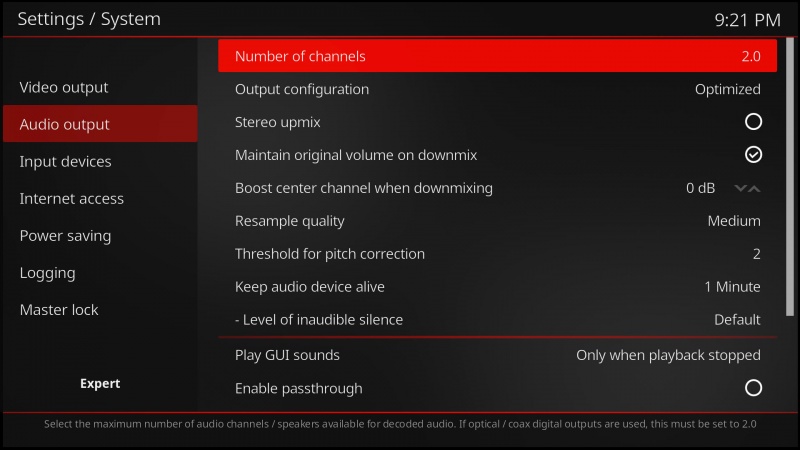
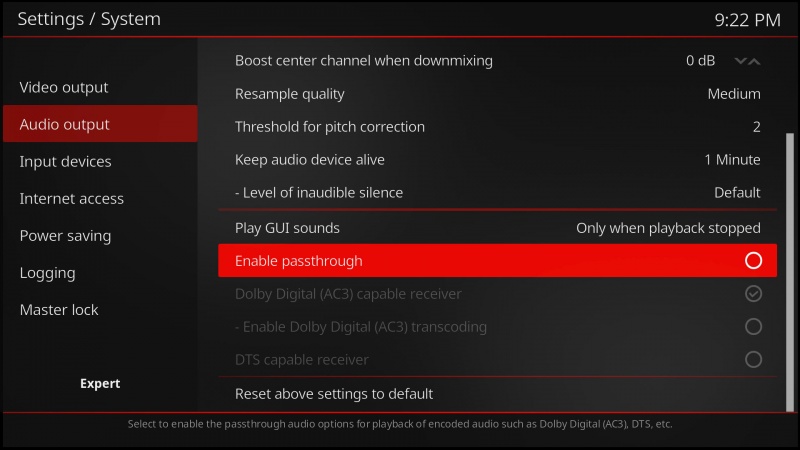
Settings -> System -> Audio output
- Number of channels: default 2.0 (stereo output), set according to your receiver/TV setup

- Enable passthrough: off
- Disabling passthrough will send uncompressed, multi-channel LPCM audio to Apple TV. This results in equal quality sound output, but receiver will not display DTS/DD light
